Windows 11 26H2 Memory Optimization for 8GB PCs
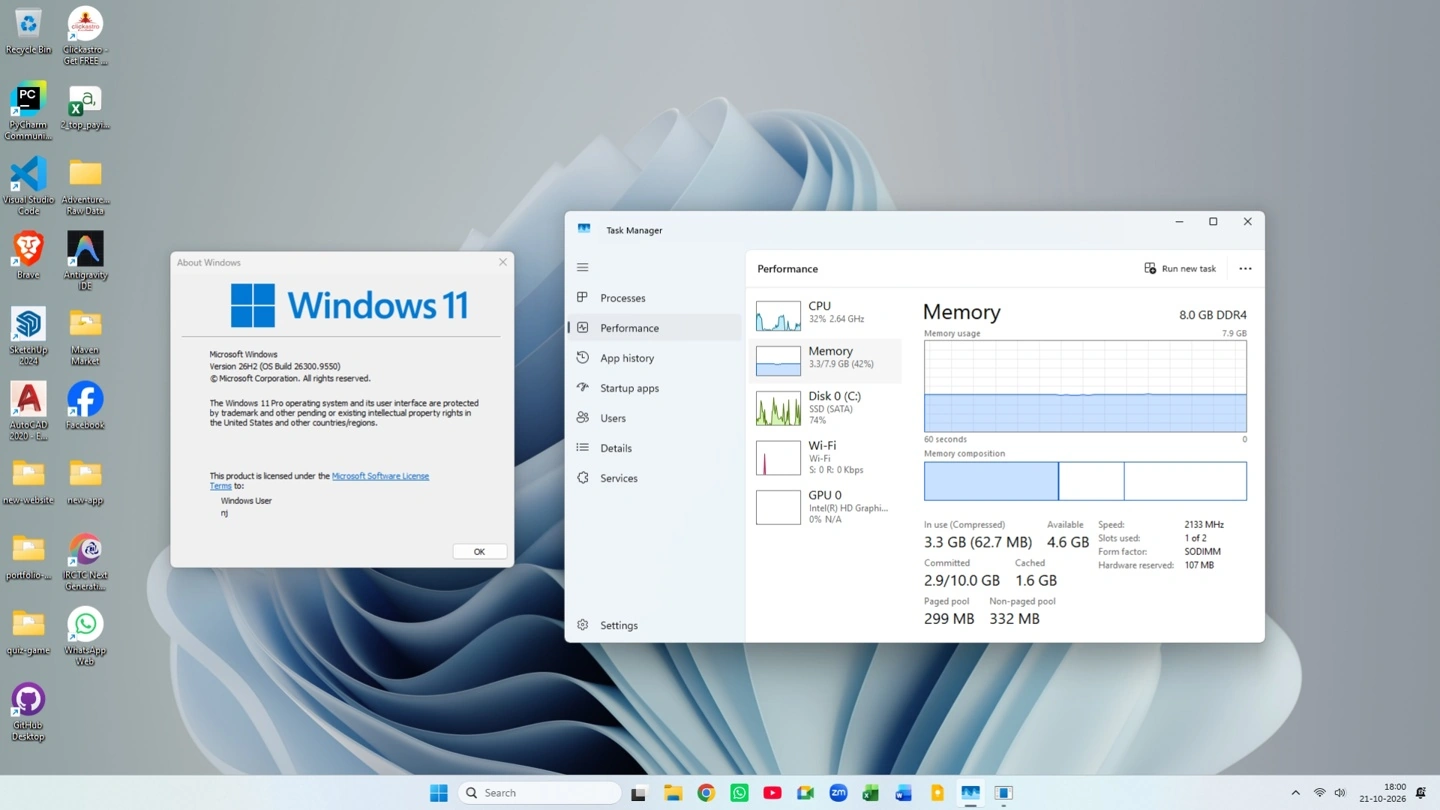
Technology outlet Windows Latest recently published an insightful report detailing their tests. They evaluated the Windows 11 26H2 operating system on a laptop equipped with 8GB of DDR4 memory. Remarkably, they discovered that boot memory consumption decreased by approximately 1.7GB compared to the 25H2 version.
Dramatic Memory Usage Reductions
Previous reports indicated that Microsoft announced significant performance enhancements for Windows 11. These upgrades boost overall responsiveness by up to 20 percent. Furthermore, the tech giant improved memory management specifically tailored for computers with 8GB of RAM.
Task Manager Statistics
The testing revealed substantial improvements across various system metrics.
| Task Manager Metric | 25H2 (Before Update) | 26H2 (After Update) |
|---|---|---|
| In Use (Physical Memory) | 5.0 GB (63%) | 3.3 GB (42%) |
| Available (Ready for Allocation) | 2.9 GB | 4.6 GB |
| Compressed (Stored Data) | 324 MB | 62.7 MB |
| Committed (Virtual Memory) | 4.8 GB / 10 GB | 2.9 GB / 10 GB |
| Paged Pool (Kernel Memory) | 633 MB | 299 MB |
| Non-Paged Pool (Retained Memory) | 508 MB | 332 MB |
Enhanced System Responsiveness
Regarding responsiveness, Microsoft stated that Windows 11 now retains active data within the memory. It can hold up to 2GB of active data instead of writing it to slower storage drives. Consequently, the system maintains rapid response times even when users open multiple applications or browser tabs.
Targeted Memory Management
In terms of memory management, Microsoft implemented specific changes for devices with 8GB of RAM or less. The operating system now loads Widgets only when opened. This intelligent adjustment frees up over 200MB of memory. Additionally, this performance optimization covers several core components. These elements include the Start Menu, File Explorer, Search, Snipping Tool, Microsoft 365, and Edge.
Real-World Virtual Machine Tests
Based on community feedback, previous user tests showed similar promising results. Upgrading from Windows 11 25H2 to 26H2 on identical hardware configurations reduced memory usage by 1.5GB to 2.0GB. According to the media outlet’s practical testing, restarting an 8GB DDR4 laptop yielded impressive metrics. The memory consumption plummeted from 5.0GB to 3.3GB compared to the 25H2 system. Meanwhile, available memory surged from 2.9GB to 4.6GB. Furthermore, compressed memory dropped drastically from 324MB to roughly 63MB.
The publication also evaluated the updated system on an 8GB virtual machine. Following a system reboot, the initial memory footprint decreased from 4.1GB down to a highly efficient range between 2.8GB and 3.2GB.