Google Chrome Deploys Advanced Anti-Scam Features
Yesterday, Google published a blog post introducing three robust new security features. These additions protect online users by identifying and thwarting constantly evolving web scams. Specifically, the updates introduce Suspicious Site Warnings, advanced Gemini model analysis, and strict ClickFix social engineering interception.
Enhancing Safe Browsing
Google stated it will further strengthen the Safe Browsing Enhanced Protection mode within the Chrome browser. Furthermore, the company is actively deploying new defensive measures against sophisticated network scams. Consequently, Chrome can now more accurately identify phishing, social engineering, and fake antivirus software. It also detects fraudulent browser updates and dangerous ClickFix attacks.
Compared to standard protection, Enhanced Protection offers users approximately ten times the security against malicious abuse. In fact, over one billion Chrome users have already enabled this advanced mode as of 2025.
Tiered Website Warnings
The first major feature introduces a tiered website warning system. Chrome will now clearly divide risk alerts into “suspicious” and “dangerous” categories. The former targets pages with lower confidence scores that might still cause harm. Therefore, it utilizes differentiated interfaces, icons, colors, and text to urge extreme user caution. Meanwhile, the latter targets websites officially classified as highly malicious. Consequently, it continues displaying the familiar, full-page red blocking warning.
Integrating Gemini AI Defenses
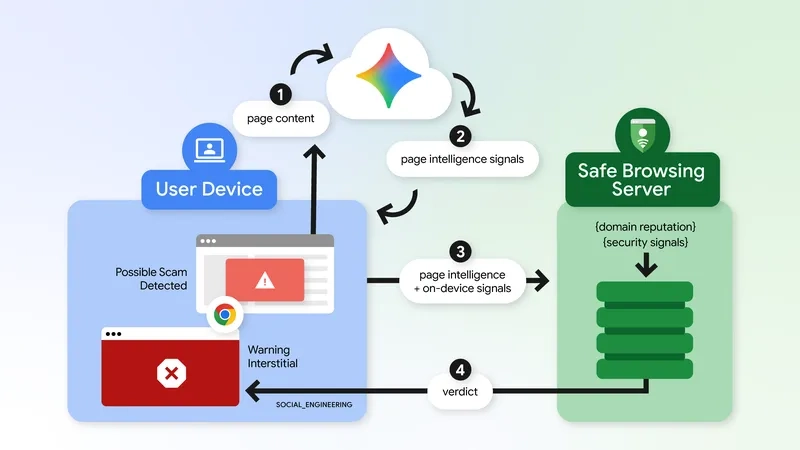
The second feature significantly expands the scope of Gemini anti-scam applications. Previously, on-device Gemini models helped identify deceptive tech support scams. Now, Google relies on a vastly more powerful server-side Gemini model. As a result, it covers a broader array of threats, including fake antivirus software and counterfeit browser updates.
This intelligent model carefully analyzes the represented brand, the page intent, and its overall scam probability score. Then, the Safe Browsing system combines these metrics with domain reputation signals to make a final judgment.
Google emphasizes a strict privacy protocol regarding this processing. Text from a webpage is transmitted to the server only after high-confidence scam indicators appear. Moreover, this content processing is entirely temporary. The data is never recorded, retained, or utilized for future model training.
Combating ClickFix Attacks
The third crucial measure directly targets ClickFix social engineering attacks. These deceptive scams heavily trick users into copying and executing commands that seemingly fix fabricated problems. In reality, these actions secretly invoke built-in system tools like PowerShell or cmd.exe. Ultimately, these hidden commands forcefully download dangerous malware onto the targeted computer.
Fortunately, Chrome can now actively detect whether a user has copied a suspicious command. After stripping away all personal identification information, the browser sends the clipboard content for Safe Browsing analysis. If the system deems the command dangerous, Chrome will immediately trigger a stern warning. Google states this mechanism aggressively pursues high precision. Ultimately, this accuracy minimizes frustrating interference with normal developer operations. You can discover more regarding its latest defenses against evolving web scams straight from the official source.