
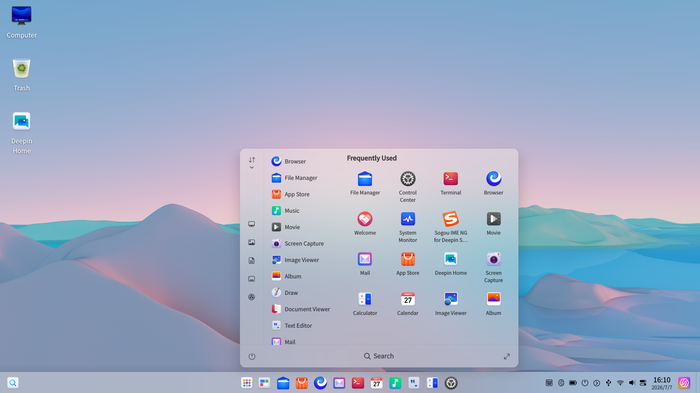
Deepin 25.3 now caps system logs at 5 GB by default. Logging also stops growing once free disk space drops below 5%. That small change targets a common Linux headache: a runaway log that quietly fills the disk.
The deepin team published the release on November 11, 2026. According to the official deepin 25.3 release notes, the update focuses on stability, performance and new features in its built-in UOS AI assistant. It also adds a new freeze protection for the desktop.
What changes for you
The most practical change is the new freeze protection. Under a severe stall, the taskbar, the Launcher and System Monitor should stay reachable. The goal is to let you find and close the app that caused the problem, instead of reaching for the power button.
Speed also gets attention. The Control Center home page loads much faster, deepin says. Common office apps should start faster even when the system is under heavy load.
Users who rely on snapshots get more flexibility. Snapshots from the Immutable System can now live on a local disk, a USB drive or a portable hard drive. A restore can start from the location you choose. The backup taken before an upgrade also uses less extra disk space.
Who gets what
- Everyday desktop users: hover over a connected device on the taskbar to disconnect Wi-Fi or Bluetooth. The shutdown animation now plays through the whole shutdown.
- NVIDIA owners: the installer now picks an NVIDIA driver that matches the detected GPU. Linyaps containers get GPU acceleration, with nvidia-container-toolkit preinstalled.
- Users with newer hardware: the default kernel is 6.6.159, but kernel 6.18.56 is available in Kernel Manager.
- Chinese hardware users: the Chinese-language release notes add that some domestic GPUs now work with Linyaps containers. The kernel update also fixes boot failures on some Phytium machines.
UOS AI learns reminders and local file search
UOS AI is the assistant that ships with deepin. In 25.3, it can create reminders, scheduled tasks and recurring tasks from plain language requests.
It also gains a whole-disk knowledge base. The assistant can answer questions about the contents of local files, but only files you have authorized. MCP servers, Skills and agent features now share one entry point. UOS AI picks the right tool for each task.
Other changes cover memory and history. Conversation memory improves, long context gets summarized automatically, and task history is kept per workspace. New per-conversation permission modes cut down on repeated approval prompts when the agent saves files.
Updated apps
Most app changes arrive through the App Store. Image Viewer gains editing tools: crop, rotate, brush, line, arrow, rectangle, circle, text, mosaic and blur. Document Viewer restores your reading position, view and layout. It also adds three eye-care modes called Classic, Green and Night.
Text Editor now renders Markdown and has better search. Calendar accepts third-party schedules. The App Store itself adds network proxy settings. When an install fails, the error details appear in Notification Center with help links.
PC Manager now comes in the image by default. It bundles system, hardware and network checks, disk cleanup, large and duplicate file cleanup, startup management and troubleshooting tools. File Manager adds a tree-style folder view in its sidebar.
Treeland and the login screen
Treeland is deepin’s Wayland compositor. This release adjusts its protocols, and deepin says the new protocols are planned for a stable release with compatibility guaranteed. Login screen controls are now easier to read on light wallpapers. Fixes cover the input method, Xwayland and window display.
Security and bug fixes
The release patches vulnerabilities in many components. The official list names Qt, curl, FFmpeg, glibc, BIND9, OpenVPN and nginx. Linuxiac’s report on deepin 25.3 also lists BlueZ and Xorg among the patched parts.
Deepin also fixed permission check, command injection and information leak issues in its own update service and Log Viewer. An Intel microcode update restores Meteor Lake mitigations. Neither the release notes nor Linuxiac list CVE numbers.
Other fixes target the taskbar, power, touchscreen gestures, rotated displays, Bluetooth and notifications. Media fixes include video black screens and hardware decoding problems. The Chinese notes add Music fixes for importing AC3 and AMR files.
Before you install: known issues
The English notes list three open problems:
- Launcher group folders show folder and app names incorrectly.
- Image Viewer memory use grows when you zoom with the scroll wheel.
- The Launcher can appear in Multitasking View when opened from the Launcher.
The Chinese notes list a fourth one. The carousel images on the installer’s waiting screen still need replacing. It is cosmetic, but it shows the two versions of the notes are not identical.
Download, architectures and how this release fits
The deepin 25.3.0 image mirror has folders for four architectures: amd64, arm64, loong64 and riscv64. The amd64 ISO is 7,232,917,504 bytes, or roughly 7.2 GB. Neither version of the release notes includes upgrade steps.
| Item | Deepin 25.3 detail |
|---|---|
| Release date | November 11, 2026 |
| Default kernel | 6.6.159 |
| Optional kernel | 6.18.56 (Kernel Manager) |
| Log limit | 5 GB, stops below 5% free disk |
| ISO architectures | amd64, arm64, loong64, riscv64 |
| amd64 ISO size | About 7.2 GB |
Deepin 25 arrived in June 2025 and introduced the immutable design. Deepin 25.1 followed in April 2026 and moved the newer kernel branch from 6.12 to 6.18. Deepin 25.2 came in July 2026 with Treeland work and image content search.
What remains unclear is how existing 25.x installs should move to 25.3. The notes say the app changes ship through the App Store, but they give no system upgrade guide. The deepin homepage points new users to its download page and an installation guide.