
The SignDrop zero-day only targets Windows PCs where log-file signing in the Common Log File System (CLFS) is switched on. One registry value tells you whether your machine is in scope. Microsoft’s own support page lists that signing feature for just three Windows releases: Windows 11 version 25H2, Windows 11 version 26H1 and Windows Server 2025.
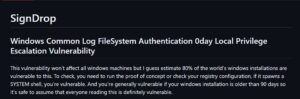
SignDrop is a public exploit that lets a standard user gain SYSTEM, the highest privilege level in Windows. Security researcher Abdelhamid Naceri, who posts as Nightmare Eclipse and MSNightmare, released the code on the SignDrop GitHub repository on November 10, 2026. That was the same day as Microsoft’s November Patch Tuesday, and the update did not address it. There is no CVE and no dedicated patch yet.
What changes for you
SignDrop is a local privilege escalation bug. An attacker must already run code on the PC as a normal user. It does not let anyone break in over the network on its own. Security firm Cyderes notes that every release from this researcher has needed such a local foothold.
The risk depends on one setting. Microsoft added CLFS log authentication in Windows updates released on or after October 28, 2025. The feature starts in a 90-day “learning” period and then switches to enforcement. According to The Hacker News report on SignDrop, both modes fall within the exploit’s claimed scope. Naceri put it simply: machines installed more than 90 days ago are generally vulnerable.
The table below uses the mode values from Microsoft’s CLFS authentication support page (KB5056852) and the scope described by researchers.
| Mode value | Microsoft’s meaning | SignDrop scope |
|---|---|---|
| 0 | Enforced | In scope |
| 1 | Learning mode | In scope |
| 2 | Disabled by an administrator (not recommended) | Outside claimed scope |
| 3 | Disabled automatically by the system | Outside claimed scope |
| Key missing | Mitigation not present | Exploit exits, per Cyderes |
Business users face the same rule, but at scale. Cyderes advises IT teams to query the Mode value on every host and to put Mode 0 and Mode 1 systems first for detection coverage.
How to check your PC
- Open Registry Editor and go to
HKEY_LOCAL_MACHINE\SYSTEM\CurrentControlSet\Services\CLFS\Authentication. - Read the
Modevalue. You can also runGet-ItemProperty -Path "HKLM:\SYSTEM\CurrentControlSet\Services\CLFS\Authentication" -Name Modein PowerShell. - Treat a value of 0 or 1 as in scope. Cyderes adds that the value alone does not prove the exploit will succeed.
- Do not switch the feature off. Microsoft says it does not recommend setting Mode to 2. The researcher and Cyderes warn that disabling it reopens older memory corruption bugs in CLFS.
- Keep installing Windows and Defender updates, and watch Microsoft’s security update guide for a fix.
Admins who manage many PCs can see how the feature is set in policy. Microsoft documents a Group Policy setting named “Enable / disable CLFS logfile authentication” under Computer Configuration, Administrative Templates, System, Filesystem. If that policy is Not Configured, the mitigation is on by default. Intune uses the custom OMA-URI ./Vendor/MSFT/Policy/Config/FileSystem/ClfsAuthenticationChecking.
Naceri also suggests running the proof of concept itself to test a device, BleepingComputer reported. On a real work machine, the registry check is the less risky option, because the exploit is built to open a SYSTEM shell.
How SignDrop works
This section covers the technical chain. General readers can skip it.
CLFS is a kernel driver, clfs.sys, that handles log files for Windows apps and services. Microsoft’s mitigation adds an HMAC code to each log so CLFS can verify the file before it parses it. In learning mode, CLFS writes missing codes if the caller has write access. CLFS also creates a .cnpf patch file next to each log. Microsoft says this file holds recovery data for logs that were not closed cleanly.
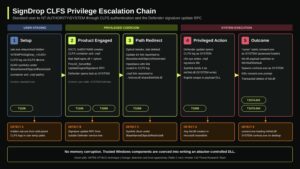
SignDrop abuses the creation of that .cnpf file. SecurityWeek explains that CLFS tries to sign an empty container whether or not the signature file exists. If the file is missing, CLFS creates it with SYSTEM privileges.
A standard user prepares a log that points to a container they control. The exploit then calls Defender’s signature update interface, so the Defender antimalware service opens the log as SYSTEM. Object Manager symbolic links redirect the new file to a path the attacker picks. The file keeps the permissions of the attacker’s original log, so the user can still write to it.
Cyderes’ Howler Cell analysis traced the rest of the chain. The exploit writes a DLL named hid.dll into C:\Program Files\Common Files\microsoft shared\ink\. It then starts a UAC request, and consent.exe loads the planted DLL. A SYSTEM console appears, and the exploit deletes the DLL afterward. Cyderes says this cleanup means file evidence will be gone by the time analysts look.
“Everything is done properly by Microsoft here but the logic allows abuse,” the researcher wrote, as quoted by The Hacker News.
Test results do not fully agree
Cyderes reproduced the exploit from a standard user session. It got a SYSTEM console with no visible UAC prompt. The firm rates the claim of SYSTEM access on systems with CLFS authentication active as high confidence.
A second test was less positive. Sungyup Nam, head of research at South Korean firm 78researchlab, said colleague Heewon Song found that the exploit works. Song judged it not reliable enough for real attacks, according to The Hacker News. The same report says the exploit changes every UAC prompt to open a normal shell and a SYSTEM shell, which anyone at the PC would notice. Defender must also be enabled for the published chain to work.

Two of Naceri’s claims remain unverified. He estimates that about 80% of Windows installations are vulnerable. Cyderes rates that figure as low confidence and says no data supports it. He also claims the method could bypass tamper protection in antivirus and EDR products. The Hacker News notes that this broader claim has not been tested.
What Microsoft says
Microsoft told SecurityWeek that it is “actively investigating the reported vulnerability.” The company also said that Microsoft Defender “detects and blocks exploitation of this vulnerability” and alerts on the privilege escalation behavior. It added that it has not observed exploitation in the wild.
Cyderes takes a different view on detection. It says defenders should not rely on Defender alone here, because the exploit uses Defender as the privileged actor. Its top alerts are any hid.dll creation in the ink folder and Defender update calls from processes outside the Defender service. It also tells teams to keep file, image load and process telemetry for that folder.
A year of CLFS hardening, then a bypass
- August 27, 2024: Microsoft blogs about CLFS hardening. Cyderes says the bug class it targets was behind 19 of 24 CLFS CVEs over five years.
- October 28, 2025: Updates for Windows 11 25H2 and Windows Server 2025 start shipping the CLFS authentication mitigation.
- April 3, 2026: The researcher’s first public zero-day release in this run, by Cyderes’ count.
- June 9 and July 9, 2026: Naceri drops the RoguePlanet Defender exploit, and Microsoft fixes it as CVE-2026-50656.
- November 10, 2026: SignDrop appears on GitHub on Patch Tuesday.
- November 12-13, 2026: Cyderes publishes its analysis, and Microsoft confirms its investigation to SecurityWeek.
Cyderes counts sixteen public zero-day releases from the same researcher between April 3 and November 10. Microsoft has fixed some of them, including ShieldBreak, RoguePlanet, YellowKey, GreenPlasma and MiniPlasma, BleepingComputer reported. The Hacker News says three of his earlier Defender flaws have been exploited in attacks. CISA’s catalog lists 10 exploited CLFS flaws.
What remains unclear
Microsoft has not said which Windows versions SignDrop affects. Its support page does not list Windows 10 or Windows 11 24H2 for the CLFS mitigation. Cyderes says the exploit exits when the mitigation is not active. Even so, there is no official word on those versions yet.
There is also no date for a fix or a CVE. Cyderes expects the fix to need kernel changes to how CLFS resolves paths when it creates signature files. Microsoft also notes that the 90-day learning period “may change in the future.” Watch for an MSRC advisory and for word on whether other antivirus engines can play Defender’s role in the chain.