The Innovative Magnetic USB-C Port of the Surface Laptop Ultra
Inside the Microsoft Laboratory
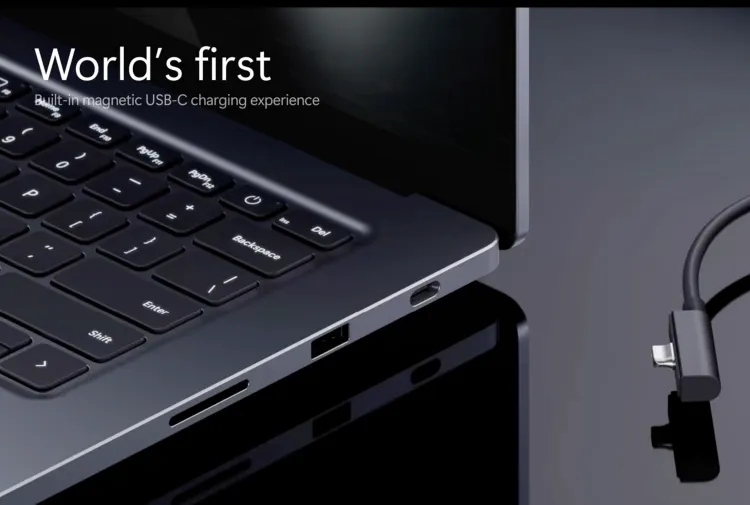
According to a recent report by The Verge, a visit to the Microsoft laboratory revealed a fascinating story. It showcased the meticulous creation process behind the new Surface Laptop Ultra. The design team completed over 300 iterations. Consequently, the device competes more fiercely against the Apple MacBook Pro. Microsoft wanted the exterior to truly rival the MacBook. Therefore, the company ingeniously revamped the traditional Surface Connect charging port. Officials officially named this new iteration Magnetic Connect. For those following the news, Microsoft’s Surface Laptop Ultra has built-in magnetic USB-C charging.
Overcoming Design Constraints
Jit Hirani serves as the lead designer for Microsoft Surface devices. He shared some remarkable insights regarding the project. “During the development phase, our engineering team iterated approximately 300 times,” he stated. “As a result, we crafted the world’s first product featuring a built-in magnetic USB-C port.” Furthermore, the team faced a significant challenge from the start. “From the very beginning, our only strict constraint was clear,” Hirani explained. “We absolutely could not alter the universal USB-C standard.”
A Seamless User Experience
Microsoft refused to sacrifice a standard USB-C port for a proprietary solution. Instead, the engineers cleverly built a magnetic interface around it. Moreover, the daily usage experience closely mirrors the original Surface Connect. It clearly displays a charging indicator light for convenience. Additionally, users do not need to align the cable precisely. You can simply unplug the cord from the 140-watt charger. Next, you can flip the cable over and plug it back in. Finally, you can use the standard USB-C end to charge other devices.
The Future of Surface Charging
Ostrom noted that Microsoft spent several years perfecting this solution. Therefore, reviewers naturally wondered about the future. Will this exciting technology appear on more Surface devices soon? “We shall wait and see,” Ostrom replied with a smile. “We undoubtedly poured a tremendous amount of effort into this specific technology. Ultimately, we want to proudly introduce it to the world right here.”