Apple Redesigns iPhone Duo Focus Mode
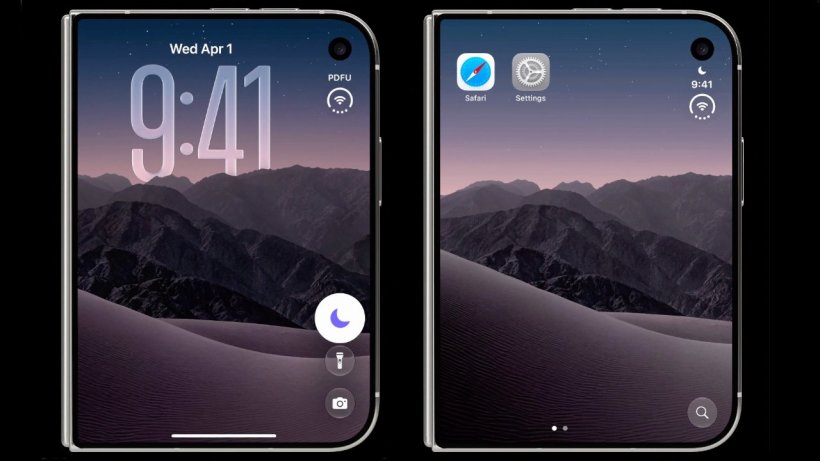
On October 4, a reliable source known as @itspdfu shared intriguing details regarding Apple’s inaugural foldable device. Specifically, the leaker revealed a completely redesigned iPhone Duo Focus Mode control system for the lock screen. By thoroughly investigating the iOS 27.1 beta, the developer discovered these exciting interface modifications. Apple is actively modifying the visual layout specifically for the compact exterior display.
Optimizing the Outer Screen Experience
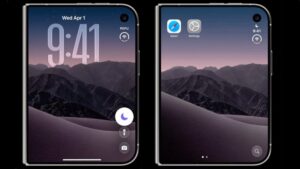
The highly anticipated foldable smartphone features a significantly smaller and shorter outer screen. Consequently, the existing system controls consume far too much valuable digital space. The updated design brilliantly removes text labels and retains only intuitive icons. This clever adjustment creates a much cleaner lock screen layout that perfectly suits the restricted viewing area.
While on the lock screen, users can now effortlessly enable or disable the feature with a single tap. Conversely, the current software version redirects individuals to a dedicated settings page. Therefore, the old method requires unnecessary extra steps just to toggle the status.
Repositioning Essential Interface Elements
Upon unlocking the device, the icon on the exterior display elegantly shifts above the digital clock. Currently, this specific graphic sits directly adjacent to the time at the top of the screen. The fresh layout effectively separates the button from the right-aligned clock and the newly repositioned application Dock.
Advanced Safari Support for Foldables
Furthermore, the informant disclosed yesterday that the Safari browser firmly supports two advanced developer tools. These include the Device Posture API and the Viewport Segments API. Ultimately, these powerful programming interfaces provide foundational support for websites to adapt flawlessly to complex dual-screen architectures.
Software engineers can easily test these capabilities within the digital device simulator. They simply need to navigate through Settings, select Apps, choose Safari, enter Advanced, and finally enable the Feature Flags. Consequently, modern web pages can dynamically adjust their structural layout and interactive elements. These real-time changes depend entirely on whether the physical hardware is folded, unfolded, or utilizing a split-screen configuration.