
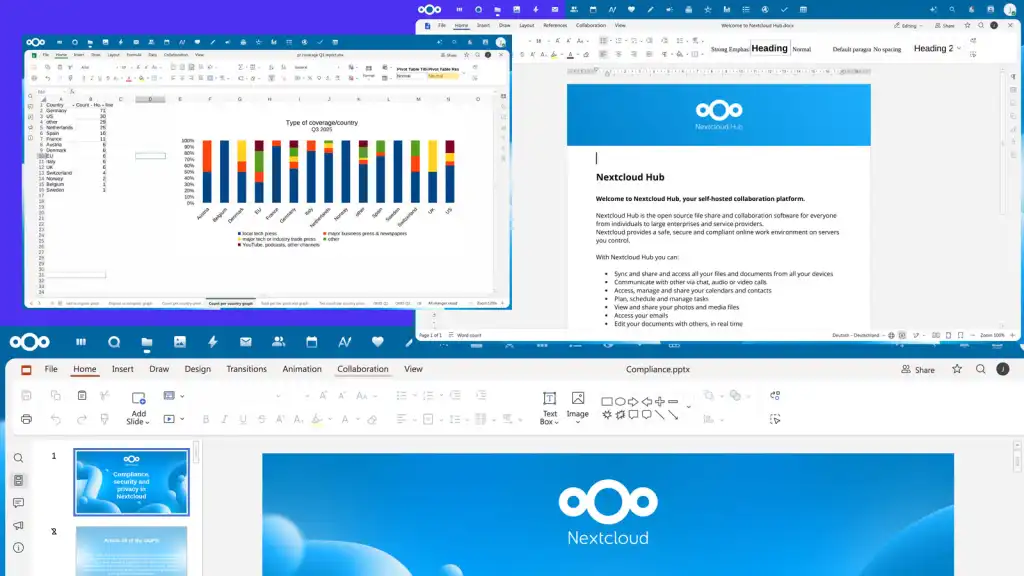
You can now install Euro-Office as a regular desktop app and edit files with no internet connection. Nextcloud released the free Nextcloud Office Desktop app for Windows, macOS and Linux. It includes editors for text documents, spreadsheets, presentations and PDFs.
The company announced the app in a Nextcloud blog post about the Office Desktop app on November 13, 2026. The current build is version 9.3.8, listed on the Nextcloud Office Desktop v9.3.8 release page on GitHub.
There is a catch for some readers. Two desktop builds now exist from the same code, and they are not meant for the same people. This article explains which one to pick, what each group of users gets, and what Nextcloud has not said yet.
What Euro-Office is
Euro-Office is an open source office suite backed by European companies. Its Euro-Office GitHub organization page lists 12 partners and supporters. They are Abilian, BTactic, EuroStack, IONOS, Nextcloud, Office.EU, Open-Xchange, OpenProject, Proton, Soverin, Tuta and XWiki.
The project is a fork of ONLYOFFICE. Its code base comes from ONLYOFFICE Open Source and uses the AGPL-3.0 license, though some repositories use Apache-2.0. Nextcloud says the first production-ready Euro-Office release arrived on June 9, 2026.
Until now, Euro-Office mainly ran in a web browser. Its Document Server is not a standalone application, according to the project. It needs a platform such as Nextcloud to store files. The new desktop app removes that need for local work.
Why the project forked ONLYOFFICE
The Euro-Office page gives several reasons for the fork. These are the project’s own claims:
- ONLYOFFICE typically does not review or accept outside pull requests, and its build instructions are often outdated or broken.
- ONLYOFFICE closed off some mobile features, such as mobile editing, and removed an administrator panel.
- The code base contains binary and obfuscated blobs, and most internal code comments are in Russian.
- ONLYOFFICE is a Russian company with mostly Russia-based developers. Some users need software that the Russian government cannot potentially influence or control.
The project adds that forking “should be a last resort.” None of the sources include a response from ONLYOFFICE.
Two builds, one code base: which one to install
The Euro-Office project says it ships “two builds made from the same source.” Both include Desktop Editors for Windows, macOS and Linux. The difference lies in signing and support.
| Detail | Nextcloud Office Desktop | Euro-Office DesktopEditors |
|---|---|---|
| Intended use | Production use | Testing and contributing |
| Code signing | Signed builds | Unsigned community builds |
| Package repositories | Yes | Not mentioned |
| Support | Professional support, per the Euro-Office page | No support subscriptions at the moment |
| Where to get it | Nextcloud install page | Euro-Office DesktopEditors repository |
| License | AGPL v3 for contributions and the Desktop Editors code | |
For most people, the signed Nextcloud build is the safer choice. The unsigned build suits developers who want to test changes or build the app from source.
The sources do not fully agree on support. The Euro-Office page promises professional support for the Nextcloud build. The Nextcloud blog post, by contrast, only points users to GitHub issues for problems and names no paid support channel.
What changes for you
Home users and freelancers
The app costs nothing and works offline. It opens Microsoft Office formats (DOCX, XLSX and PPTX) and OpenDocument formats (ODT, ODS and ODP). You do not need a Nextcloud account to edit files on your own computer.
Fonts are a practical plus. The app uses fonts already installed on your machine, including operating system defaults such as Microsoft fonts on Windows. You can add custom fonts at any time. If a collaborator lacks the same font, they see a fallback font instead.
Nextcloud users and businesses
Teams on Nextcloud get the most from the release. One app can connect to several Nextcloud instances. You can edit online files alone or with a team in real time. You can also choose which files stay on your computer and which go to the cloud.
Users can switch between Nextcloud Hub in the browser and the desktop app. Companies with corporate fonts can install them locally without asking Nextcloud admins.
Signatures and file protection
The Protection tab lets you add a digital signature to documents, spreadsheets and presentations. A signature shows who signed the file and that nobody changed it afterward. You need a digital certificate first, from your IT team or a trusted provider. Nextcloud points EU users to the eIDAS list of trusted service providers.
The same tab can set a file password. It can also limit other people to commenting, filling in forms, or editing with tracked changes only.
Platform limits
- Windows: x64 and ARM64 builds.
- Linux: .deb packages for Debian and Ubuntu, and .rpm packages for Fedora.
- macOS: Apple Silicon only. Nextcloud lists no build for Intel Macs.
How to get started
- Open the Nextcloud install page and go to the desktop office section.
- Pick the package for your system: x64 or ARM64 on Windows, .deb or .rpm on Linux, or the Apple Silicon build on a Mac.
- To link a server, open the Home tab, click “+” in the Clouds section and choose Nextcloud.
- Enter your instance URL and log in. Repeat this step to add more instances.
- Report bugs or feature ideas through GitHub issues. Code and translation help is welcome, but contributions must stay compatible with AGPL v3.
What is new in version 9.3.8
This section covers technical details for developers and Linux users. The v9.3.8 changelog lists about 80 entries compared with v9.3.6. The build comes from the Euro-Office DesktopEditors code, and the release page lists 13 downloadable assets.
- Features: an OpenCloud connection provider for desktop apps, an Android build, a Word selection statistics API, and selection counts in the word count popup.
- Bug fixes: 41 in total. They cover Windows and Linux installer and file association issues, Rocky Linux 9 amd64 builds, Wayland input and clipboard problems, and media playback on Windows, Linux and Qt6.
- File handling: fixes for several XLSX, CSV and VSDX conversion issues, ZIP header compatibility, and PDF scrolling with the mouse wheel.
- Performance: faster section updates in the text editor, a faster circular-reference check in the spreadsheet editor, and smaller help media files.
- Other: build and CI updates, new ODF and RTF tests, and removal of mobile web apps from the desktop package.
What remains unclear
Several questions are still open. Nextcloud has not said whether an Intel Mac build will follow. It also has not published support terms or prices for business users of the desktop app.
The gap with ONLYOFFICE is another point to watch. The desktop app sits at version 9.3.8. ONLYOFFICE, for its part, released ONLYOFFICE Docs 10.0 in October 2026 with AI tools and modular apps. Euro-Office has not said how it will handle future upstream changes.
Governance is still taking shape too. The project follows an informal “who codes, decides” model, and it plans a steering committee. It also says it is working on mobile apps. For now, the desktop release gives Nextcloud users and offline users a free, signed option they did not have before.